Contact Us
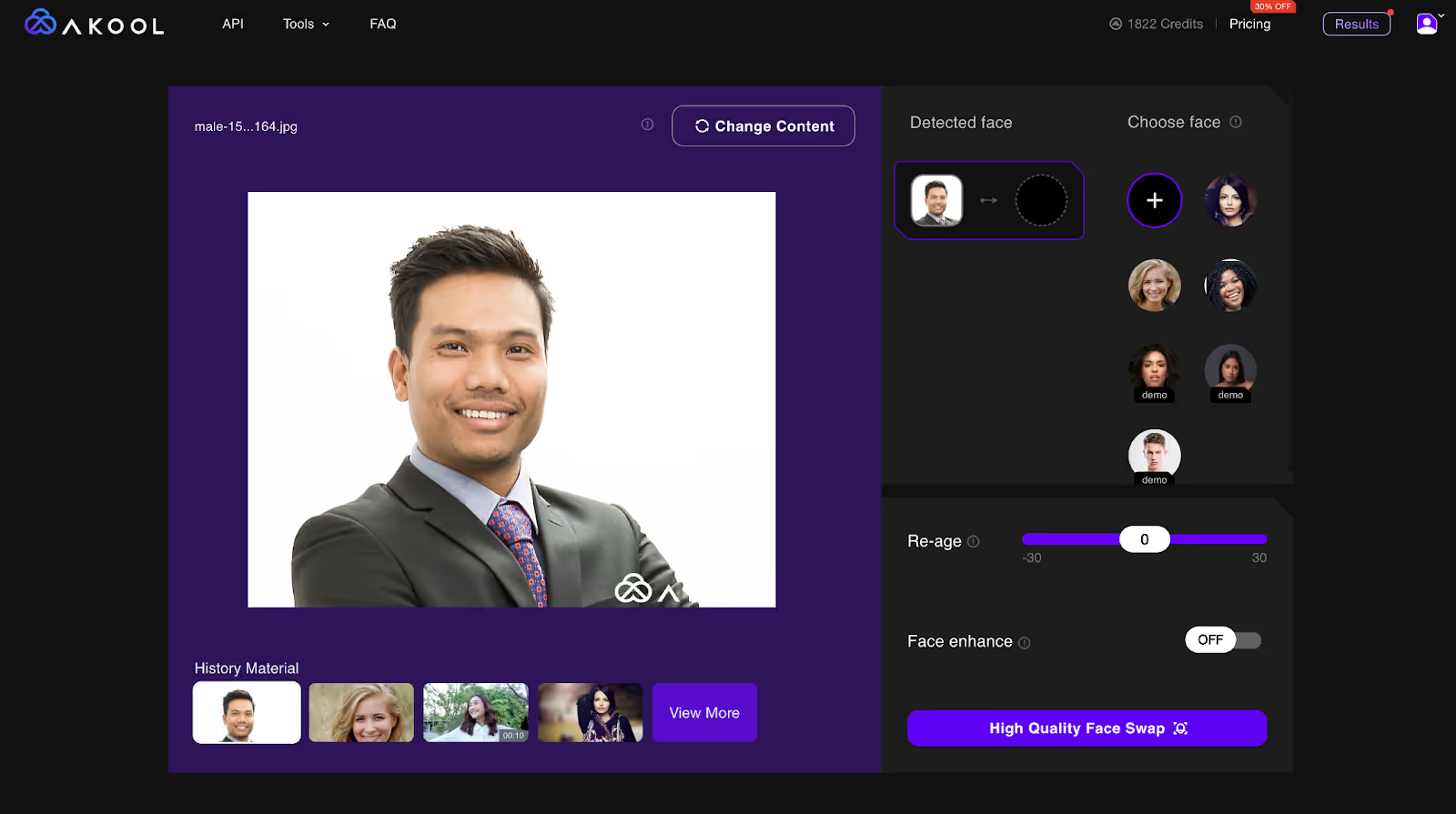
Upload a video, pick the face you want in it, and AKOOL replaces it across every frame. Expressions, head movement and lip position carry over from the original take, so the result reads as footage you filmed rather than an edit you applied.


A Revolutionary Future with Real-time Conversational Avatars

Recast a scene, produce a localised ad variant, or fix a shot you cannot film again. Upload the clip, choose the replacement face, and AKOOL handles every frame including motion, lighting and angle changes.
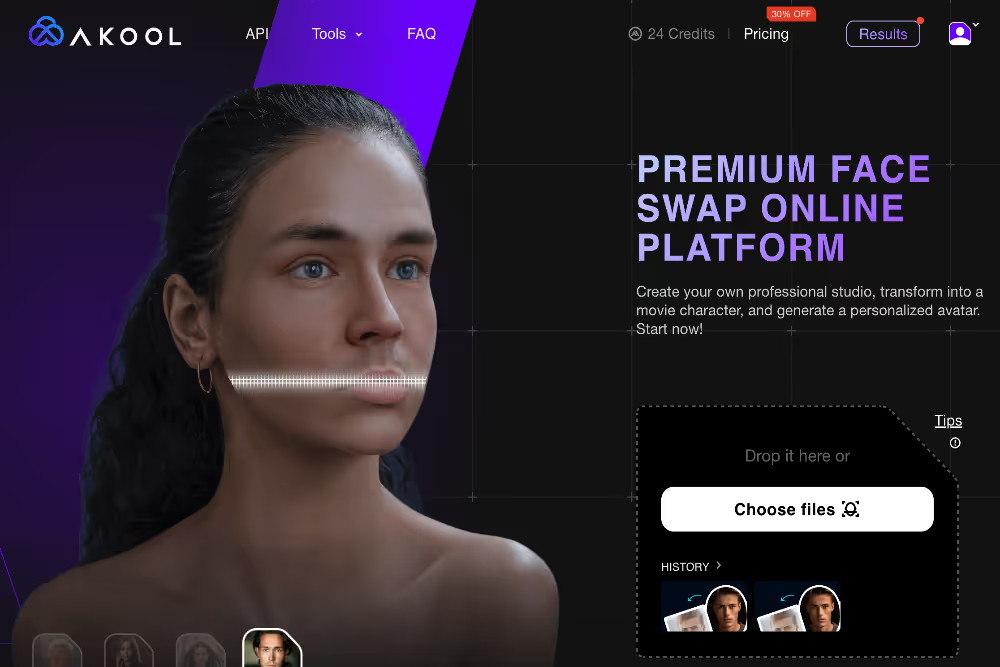
Change who is in a scene after it is shot. Filmmakers and content teams use video face swap to test casting, produce alternate versions, and swap a performer into footage without bringing the crew back.
Replace a face in an existing take instead of scheduling a reshoot. For film, advertising and broadcast teams, a swap that takes minutes removes a step that used to take days.

Put an invented character into live footage for video games, animation and digital art, or carry one consistent character across an entire series of videos.

Create content programmatically with our easy to use API
Enhance the filmmaking process by seamlessly integrating video face swap technology. Directors and producers can effortlessly replace actors' faces in scenes, allowing for creative freedom and cost-effective reshoots without the need for actors to be present on set.
Social media influencers and content creators can transform their videos and swap faces in video, engaging their audience with unique and personalized content. Stand out in a crowded digital space by creating imaginative and entertaining videos that captivate viewers.
Advertisers can use AI face swap for video to craft distinctive and memorable campaigns. Customize ad content to resonate with diverse audiences by incorporating familiar faces, enhancing brand recognition, and driving higher engagement and conversion rates.
Create heartwarming and personalized video messages by swapping faces in pre-recorded clips. Perfect for birthdays, holidays, or special occasions, our tool enables users to deliver a personal touch that leaves a lasting impression on recipients.
Corporate trainers can use faceswap technology to create customized training materials. Replace generic models with familiar faces from within the company to increase relatability and engagement, making learning more effective and enjoyable.
Educational content creators can utilize faceswap to make lessons more engaging. By incorporating recognizable figures, educators can capture students' attention, making learning more interactive and memorable across various subjects and age groups.
-30%
$ 0.05 USD / Credit
(billed yearly as $252)
25 images or 1.5 mins of video
3 Customized Instant Avatars
Upload file size limited to 150M and 30s
$ 0.05 USD / Credit
(billed monthly as $30)
$ 0.05 USD / Credit
(billed monthly as $119)
$ 0.042 USD / Credit
(billed yearly as $500)
$ 0.05 USD / Credit
(billed yearly as $252)
25 images or 1.5 mins of video
3 Customized Instant Avatars
Upload file size limited to 150M and 30s
$ 0.035 USD / Credit
(billed yearly as $252)
$ 0.033 USD / Credit
(billed yearly as $948)
$ 0.05 USD / Credit
(billed yearly as $4200)
What is AI video face swap?
AI video face swap replaces a person's face in a video with a different face, across every frame, without manual editing. You upload a clip and select the replacement face, and the system tracks the original performance so expressions, head movement and lip position carry over to the new face.
How does AI video face swap work?
AKOOL detects and tracks the face through every frame of your video, maps the replacement face onto the same position and angle, then blends it for lighting and skin tone. Because it follows the original performance rather than pasting a still, the result holds up through motion and angle changes.
Do I need video editing experience?
No. There is no timeline, no masking and no keyframing. Upload your video, choose the face you want in it, and start the swap. The whole process runs in the browser, so there is nothing to install and no hardware requirement.
What can I use video face swap for?
Teams use AKOOL video face swap for localised ad variants, recasting a scene without a reshoot, personalised video greetings, corporate training videos featuring familiar faces, and e-learning content. It is also used to anonymise people in user-submitted footage while keeping the performance intact.
What video quality and file size does AKOOL support?
Limits depend on your plan. The free Basic plan accepts uploads up to 150MB and 30 seconds. Starter and Pro raise this to 300MB and 5 minutes. Studio and Enterprise support output quality up to 8K.
How long does a video face swap take?
Processing time scales with the length and resolution of your video. Short social clips finish in minutes, while longer or higher-resolution files take proportionally longer. You can queue several videos at once rather than processing them one after another.
Is it legal to face swap someone in a video?
It depends on consent and how the video is used. Swapping your own face, a consenting participant's face, or a licensed synthetic face is generally fine. Using someone's likeness without permission, particularly to mislead or in a commercial context, can breach likeness and publicity rights in most jurisdictions. AKOOL applies content moderation to uploads and publishes a Content Moderation Policy and Trust and Safety terms setting out what is not permitted.
Can I swap more than one face in the same video?
Yes. You can select each face in the frame separately and assign a different replacement to each, then process the whole clip in one pass. This is used for group shots, interviews and crowd scenes where a single swap would not be enough.
What is the difference between video face swap and image face swap?
Image face swap replaces a face in a single still photo. Video face swap tracks and replaces the face across every frame of a moving clip, matching expression and head angle throughout, which is a substantially harder job. Use image face swap for photos and video face swap for footage. Both run inside AKOOL.