



An AI video generator from script can turn written narration into video scenes, but a series can still lose its brand identity when avatars, voices, product visuals, and pacing change from one render to the next. In AKOOL Avatar Video, you can map script lines to scenes, reuse approved avatars and voices, and review a draft before publishing. With AKOOL Avatar Video, you can map script lines to scenes, reuse approved avatars and voices, and review a draft before publishing. This article shows how to combine those capabilities with a brand control sheet and final QA process to create consistent videos from every approved script.
What Should a Script Include Before AI Video Generation?
A script for video production needs three layers: information, visuals, and brand direction. The narration alone tells the system what viewers should hear. Your production notes explain what they should see and which details must remain consistent.
Brand Inputs an AI Video Tools Cannot Infer From a Script
Before generating, define the inputs that shape the message, visual system, and publishing requirements:
- Audience, campaign goal, core message, and CTA
- Brand tone, approved terminology, and prohibited language
- Product names, packaging rules, and approved product visuals
- Logo treatment, colors, typography, and disclaimer requirements
- Presenter, avatar, or character requirements
- Aspect ratio, platform format, and publishing requirements
- Rights, consent, and disclosure requirements for uploaded media
Keep identity assets fixed. Logos, approved product views, mandatory copy, and recurring presenters should carry over from one video to the next. Camera framing, supporting backgrounds, transitions, and B-roll can vary within the approved system.
Add Production Notes Beside Every Script Block
Place production notes beside every spoken line. This gives your AI video creator a usable production brief and gives reviewers a way to approve the creative direction before rendering.
This approach makes AI video creation easier to review because every scene records the message, intended visual, and non-negotiable brand rule in one place.
Build a Brand Control Sheet Before You Generate
A brand control sheet gives creators and reviewers a shared decision standard. Similar prompts can still produce different lighting, pacing, language, or visual hierarchy when the key rules live only in email threads or individual memory. For a broader framework, see our guide to maintaining brand consistency across AI-generated videos.
Separate Fixed Brand Assets From Flexible Creative Choices
Divide your control sheet into fixed assets and flexible creative choices. Fixed assets establish recognition. Flexible choices keep a content series fresh without changing the audience’s understanding of the brand.
Review the fixed column before every new script. A creator can test a new angle or background while protecting the logo treatment, product appearance, and spokesperson viewers already recognize.
Define Voice Rules for Scripts and On-Screen Copy
Document how your brand speaks. Include preferred sentence length, approved terms, prohibited phrases, CTA style, capitalization rules, and the maximum amount of text that should appear on screen.
Apply those rules to voiceover, captions, titles, and end cards. If the narration says “Get started today,” screen text should not suddenly shift into abstract or overly promotional language. A consistent writing system makes a series feel connected even when each video covers a different topic.
Break the Script Into Short, Reviewable Scenes
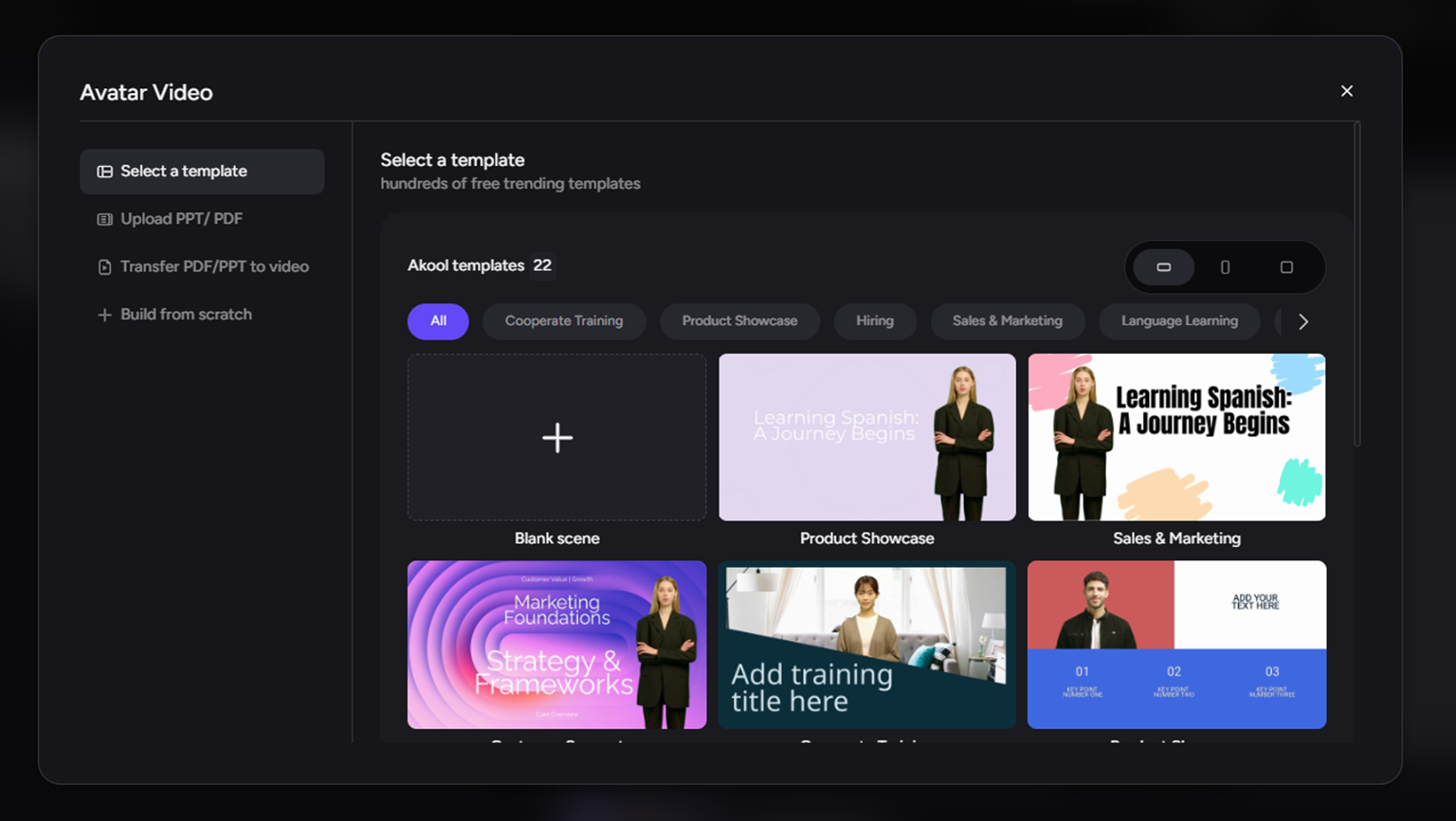
Long scripts hide too many decisions inside one generated sequence. Divide the content into scenes with one information goal, one primary visual action, and one review point.
Give Each Scene One Job
Record the goal, narration, main visual, screen text, duration, and transition for each scene. Avoid asking one scene to introduce a feature, demonstrate a product, switch presenters, and deliver a CTA at the same time.
A focused scene creates a clear revision path. If the product view needs correction, update that scene. If narration needs a longer pause, change that section without rebuilding approved content elsewhere.
Map Script Lines to a Storyboard Timeline
A storyboard connects each script line to a shot and checks continuity between shots. It helps you track the presenter, background, product state, and narrative progress from opening problem to final action. For supporting scenes that need generated visuals instead of a presenter, use our Text to Video tool to create footage from the approved scene brief.
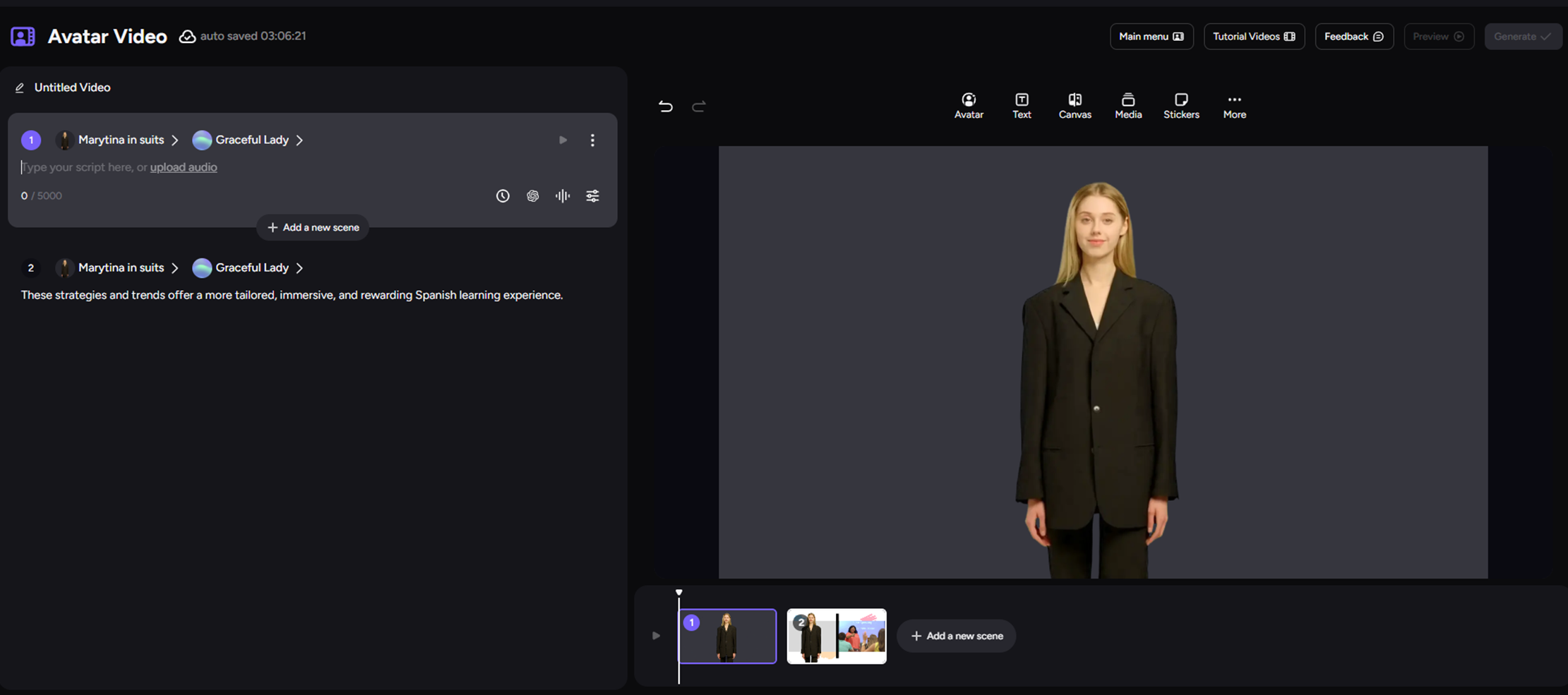
In our Avatar Video workspace, the Storyboard Timeline lets you split a video into shots and match each one with script lines. Use it to keep an AI video generator from text workflow organized, then have a human reviewer approve the resulting brand treatment.
Set and Reuse the Same Avatar, Voice, and Visual System
A recurring video series benefits from a stable presenter system and visual framework. Select the approved elements once, document them in the control sheet, and reuse them across related scripts.
Choose One Presenter System for the Campaign
Use the same custom avatar for explainers, onboarding, training, product education, and recurring social content that depends on a recognizable spokesperson. A preset avatar can suit a short campaign when it aligns with the approved creative direction.
Treat every presenter as a brand asset. Use a face, voice, image, or audio file only when you own the rights or have clear permission. Keep records of approvals, especially when the video represents an employee, creator, customer, or public-facing brand personality.
Keep Voice, Background, and Template Decisions Reusable
Map your brand control sheet to an approved voice style, background type, screen-text density, title treatment, and template layout. In our Avatar Video workspace, you can reuse customizable avatars, AI voices, audio uploads, and templates to carry approved presenter and layout choices into later projects.
Different channels can require different dimensions or video lengths. Preserve the recognition signals that matter most, including the product treatment, voice character, CTA pattern, and color system.
Set Pacing Around Meaning, Not Just Word Count
Set pacing around information complexity. Give viewers enough time to read an on-screen product label, understand a visual change, and process the CTA. Add deliberate pauses after key claims and before the final action.
Review narration and visuals together. Fast voiceover combined with fast scene changes can make even a short message hard to absorb. A scene may need more time when it introduces a new feature, legal disclosure, or decision.
Review the Final Video Against Brand and Campaign Standards
A completed render is a draft until it passes both message review and brand review. Use one pass for accuracy and another for visual, audio, rights, and publishing requirements.
Run a Script-to-Render Check
Compare the video to the approved script line by line. Confirm product names, numbers, CTA wording, disclaimers, captions, and links. Check that the presenter’s delivery fits the intended tone and that visuals support the spoken message.
This pass catches errors that can weaken trust, including missing words, an outdated URL, an incorrect product screen, or a claim that sounds stronger than the approved wording.
Use a Final Brand QA Checklist
Before publishing, check the following:
- Avatar, voice, pronunciation, and product visuals match approved assets.
- Logo, colors, typography, and background follow the control sheet.
- Captions, CTA, links, and disclaimers are accurate and readable.
- Pacing gives viewers enough time to understand key information.
- Dimensions, audio quality, rights, permissions, disclosures, and platform specifications are complete.
Create and approve one representative sample before producing multiple variations. Our preview workflow helps you inspect the draft, while human reviewers remain responsible for final brand approval.
Put the Script-to-Video Workflow Into Practice With AKOOL
An AI video generator from script becomes easier to manage when you combine a control sheet, scene mapping, reusable assets, and a defined QA process. Build one approved script in Avatar Video, map it into scenes, select the approved presenter and voice, and create a sample for review. After that sample meets your campaign standards, reuse the framework for a series, channel-specific edit, or new creative variation.


